

Students rarely see writing happen. They see finished essays, polished examples, and model answers with every rough edge already sanded off. What they almost never see is the messy middle: the false start, the deleted sentence, the moment a writer stops and asks, “Wait, is this actually what I mean?”
That’s the gap modeled writing fills. And with projectors, shared Google Docs, and smartboards in most classrooms, teachers have better tools for it than ever, along with a few new ways for a live demo to go sideways.
Why Students Need to See Writing in Progress
The national data on writing has been sobering for a long time. In the most recent NAEP writing assessment with released results, only 27% of U.S. students in grades 8 and 12 performed at or above Proficient (NCES, 2011). That was 24% at Proficient and 3% at Advanced. NCES did not release results from the 2017 digital writing assessment because of device-related effects on scores, and the current NAEP schedule through 2033 includes no writing assessment at all, according to the American Academy of Arts and Sciences.
In other words, the most recent national snapshot is old, and there isn’t a new one coming. Teachers are largely on their own to figure out what works.
The research on instruction is clearer. The What Works Clearinghouse practice guide for secondary writing gives its strongest evidence rating to a Model-Practice-Reflect cycle: explicitly teaching writing strategies by modeling them first (IES/WWC, revised 2019).
What the Research Says About Strategy Instruction
The classic Writing Next meta-analysis (Graham and Perin, 2007) ranked instructional approaches by effect size. Explicit teaching of writing strategies tied for the top spot with summarization instruction.
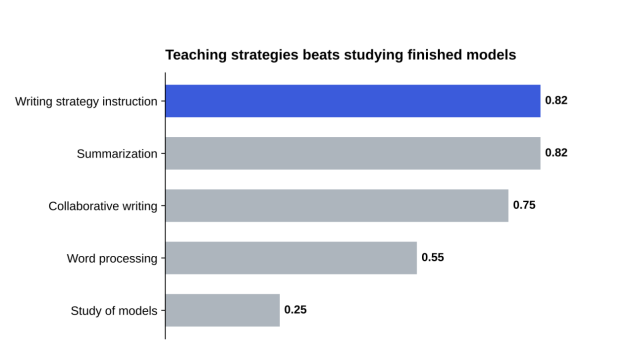
Effect sizes of selected writing interventions. 0.2 = small, 0.5 = medium, 0.8 = large. Source: Graham and Perin, Writing Next, 2007.
Strategy instruction scored 0.82, a large effect. Notice that simply studying finished models scored only 0.25. Showing students a polished essay isn’t the same as showing them how one gets written. The Self-Regulated Strategy Development approach, which includes an explicit “Model It” stage, reports effect sizes typically above 0.85 in meta-analyses (IES).
Writing Next is from 2007, so treat it as foundational rather than current. But the newer WWC guides reach the same conclusion: modeling the process matters.
What a Strong Modeled Writing Session Looks Like
The Victorian Department of Education describes modeled writing as a short, teacher-controlled session, usually 5 to 10 minutes, focused on one specific skill. Students watch and listen. They aren’t contributing yet.
Pick one move to teach
Don’t model “writing an essay.” Model one thing: writing a hook, choosing evidence, cutting a wordy sentence, transitioning between paragraphs.
Think out loud constantly
The narration is the lesson. “I’m starting with this example because it’s the most surprising. Actually, no, that sentence is too long. Let me split it.” The NCES blog on modeling put it well in January 2026: when teachers think aloud and write alongside students, they invite students into the process.
Make real mistakes and fix them
Two Writing Teachers recommends showing your mistakes and keeping sessions short. A flawless demo teaches less than one where the teacher visibly revises.
Hand it off quickly
Modeling only works if students practice the same move right after. Model, practice, reflect.
Know when to shift to shared writing
Once students have watched a move a couple of times, invite them in. Shared writing, where the class suggests sentences and the teacher types, is the natural next step before students try it alone. It keeps the gradual release going without throwing them in too early.
Running Live Writing Demos on a Projector or Shared Doc
Typing in front of 30 students is its own skill. Few teachers love it.
Common Problems With Live Typing
- Typos that become the focus instead of the lesson
- Typing too fast for students to follow, or too slow to keep attention
- Losing your train of thought while also managing the keyboard
- Wasting precious minutes of a short session
RAND’s 2025 State of the American Teacher survey found teachers worked an average of 49 hours a week, about 10 hours more than they were contracted for. Nobody has spare time to re-run a demo that went off track.
Preparing Smoother Demos
A few practical fixes:
- Write your demo text in advance, including the deliberate mistakes and revisions you plan to make
- Increase font size to at least 18 point in the shared doc
- Use a separate device for your notes so the projected screen stays clean
- Pace your typing to roughly speaking speed so students can read along
Using an Auto Typer for Planned Segments
For longer passages, like a full paragraph you want students to watch take shape, some teachers use an auto typer for the planned portions and type the revisions live. That lets you focus on narrating instead of hunting for keys.
Phrasly’s human auto typer works directly in Google Docs and Google Slides. You paste in the passage you prepared, choose a slow speed (it goes as low as 30 WPM), and add natural pauses after punctuation. Text appears at a steady, human pace while you talk through the thinking behind each sentence. Its optional typo-and-correct setting can even help demonstrate real-time self-correction, though live revision by the teacher is still where the real teaching happens.
Use it as a support, not a replacement. The point of modeled writing is students seeing a writer think. The tool just handles the typing so you can do that.
A Sample 10-Minute Modeled Writing Lesson
Here’s how one session on writing a strong opening sentence might run:
- Minute 1: Name the goal. “Today I’m going to show you how I write a first sentence that makes a reader want the second one.”
- Minutes 2 to 3: Type a weak, generic opener and say why it’s weak. “This could start any essay on any topic. That’s the problem.”
- Minutes 4 to 6: Try two alternatives out loud, a surprising fact and a short scene. Type both, compare them, and pick one.
- Minutes 7 to 8: Tighten the chosen sentence word by word, deleting as you go.
- Minutes 9 to 10: Recap the steps on the board and send students to try the same move in their own drafts.
The whole demo produces one sentence. That’s fine. The lesson is the decision-making, not the word count.
Adapting Modeling for Different Age Groups
Elementary Classrooms
Younger students need shorter demos and more concrete moves: capital letters, adding a describing word, stretching one sentence into two. Write big, write slowly, and invite them to read along aloud.
Middle School
This is where structure starts to matter. Model topic sentences, choosing evidence, and explaining how a quote supports a point. Students at this age also benefit from seeing a teacher abandon a sentence that isn’t working.
High School
Older students can handle subtler moves: refining a thesis, building a counterargument, cutting a paragraph that repeats an earlier one. Modeling how to revise in response to feedback is especially valuable before major assessments.
Across every level, the principle is the same. Make the invisible decisions visible.
For multilingual learners, modeling carries extra value. Seeing a teacher pause over word choice, try a phrase, and swap it for a better one shows that strong writers don’t produce perfect English on the first attempt either. Keep sentence frames from the demo on screen afterward so students can borrow the structure while they practice.
Turning Demos Into Reusable Resources
Record your best modeled writing sessions. A three- to five-minute screen recording of a strong demo becomes a resource for absent students, for review before tests, and for colleagues teaching the same skill. Shared Google Docs also keep version history, which lets students replay how a paragraph evolved.
Teachers looking for more on writing tools and AI in classrooms will find relevant explainers on the Phrasly blog, including a guide on whether it’s safe to paste an essay into an AI detector.
Show the Thinking, Not Just the Text
Students learn to write by watching writing happen, not just by reading finished work. The research backs this up: modeling and explicit strategy instruction outperform studying polished examples. Keep sessions short, focus on one move, narrate every choice, and show the mistakes. Then use the classroom tech you already have, shared docs, projectors, and tools like an auto typer, to make those demos smoother and repeatable. The writing on the screen matters less than the thinking you say out loud while it appears.
