
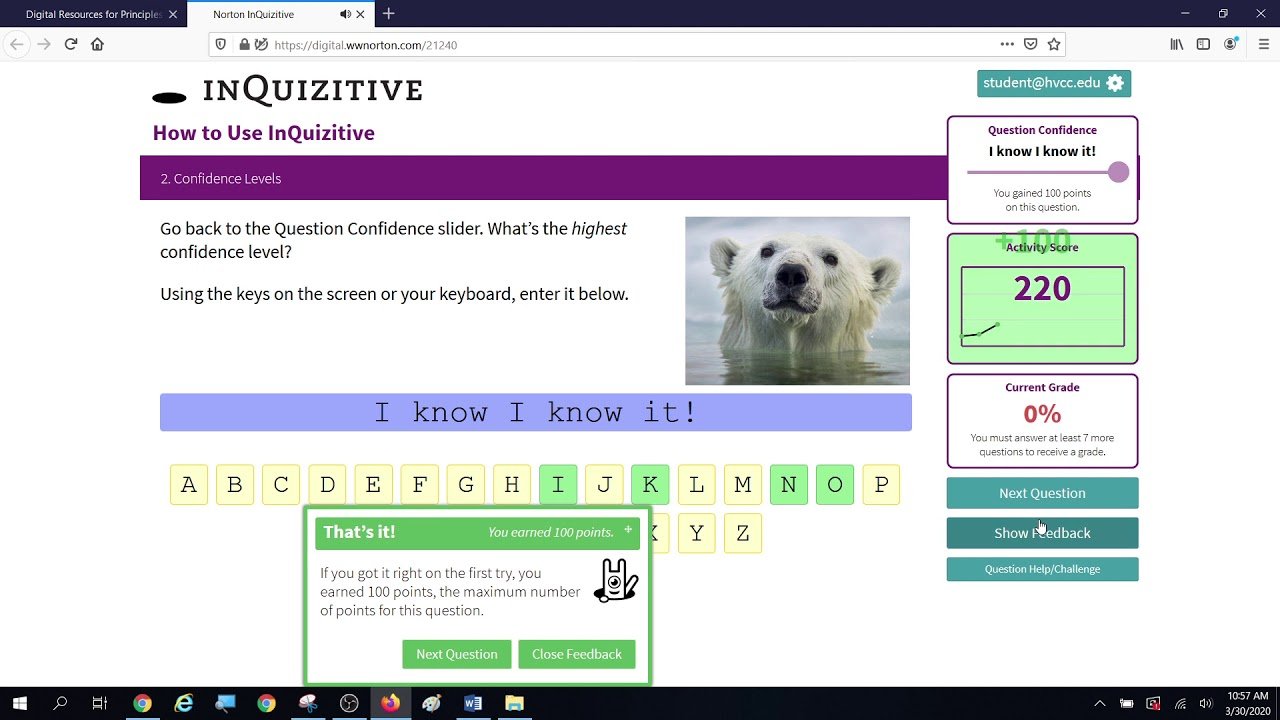
You’re halfway through an InQuizitive activity. The question looks easy enough, but there’s a slider you’re not sure about, the format isn’t plain multiple choice, and one wrong click has just cost you points. Now you’re wondering if there’s a smarter way to do this.
There is, and it isn’t a list of answers. A good InQuizitive Answer Helper teaches you how to read the question, figure out what it’s testing, and use the feedback so the next question gets easier. InQuizitive is W. W. Norton’s adaptive learning tool, so what you get wrong shapes what you see next. Once you understand how it behaves, it’s a lot less stressful.
What People Really Mean by “Answer Helper”
Nobody at Norton sells a product called an “answer helper.” It’s a search phrase, and it covers a few different things: a walkthrough like this one, a study method, or someone explaining a confusing question.
The useful versions explain how you get to an answer. An answer key just gives you the result, and you learn nothing from it. Since InQuizitive is built around feedback and doesn’t have a simple “show me the answer” button, the how is what you need anyway.
How InQuizitive Questions Behave
The activity adapts to you. Struggle with a particular learning objective and you’ll likely see more questions on it. Breeze through something and the system moves on. That’s why two students in the same class can have quite different experiences of the same activity.
The questions also aren’t all the same shape. You might pick an option, click a part of an image or sentence, drag items into place, or type something in. Feedback shows up right away, and it’s meant to point out where your thinking went off track, not just tell you “wrong.”
Treat a wrong answer as information. It’s the system telling you exactly where the gap is.
Solving Questions Step by Step
This is the routine I’d give any student, and it works for nearly every question type.
Read the whole thing first. Sounds obvious, but most mistakes come from skimming. A familiar keyword catches your eye, you click, and you’ve answered a question nobody asked. Watch for qualifiers, examples, images, and what the task actually wants from you: select, sort, drag, or type.
Work out what’s being tested. Ask yourself which chapter idea this belongs to. Once you can name the concept, half the options usually look less appealing. It also helps you flip back to the right part of the textbook if you’re stuck.
Knock out the obvious wrong options. On selection-style questions, elimination beats instant recognition. You may not know the right answer straight away, but you can often spot two that clearly don’t fit. That leaves you a better bet.
Set your confidence honestly. The slider isn’t decoration. Norton’s documentation says it changes how many points you can win or lose on that question. Cranking it to maximum every time is a habit that eventually bites. Slide it up when you know the material, and down when you’re reasoning from partial knowledge.
Commit to an answer. A reasoned attempt beats a random click, because even when you’re wrong, the feedback makes more sense when you can remember why you picked what you picked.
Read the feedback properly. Don’t rush past it. Ask what you misread, which clue you missed, and whether the problem was the content or the wording of the question. One sentence in your notes is enough.
Carry it to the next question. Because the activity adapts, the same weak spot will probably come back. That’s your chance to get it right.
Using Feedback Instead of Guessing
Plenty of students land on an InQuizitive Answer Helper because they keep getting stuck, and the temptation is to click through options until something works. It does work, in the sense that you eventually finish. It doesn’t work in the sense that you’ll remember anything for the exam.
Here’s a better pattern. Say you answer a question and the feedback shows you’ve mixed up two related terms. Don’t just memorize “the answer was C.” Go back to the textbook, find where those two terms are explained, and write down the difference in your own words. Then, when the next question leans on that distinction, you’ll notice it.
That extra minute is the whole difference between finishing an activity and learning from it.
Scores, Target Scores, and the Confidence Slider
InQuizitive scoring confuses people, so here’s the short version based on Norton’s student documentation.
You have to answer a minimum number of questions before you get a grade at all. Your activity has a target score, and reaching it earns 100%. Until then, your current grade reflects where you are. You keep answering, points build up, and you get there.
The confidence slider sets how much is at stake per question. Norton describes a range from 20 to 100 points. Higher confidence means bigger gains when you’re right and bigger losses when you’re wrong, so it’s really a way of telling the system how sure you are.
After a wrong answer, there’s usually a chance to recover some points on a second attempt. I’d be careful about assuming this works identically everywhere, though. Some question types have their own second-chance behavior, so check how your specific activity handles it. Your instructor’s setup can also change details.
Mistakes That Make Everything Harder
A few patterns I see all the time:
- Clicking before reading. Already covered, but it’s number one for a reason.
- Treating every question like multiple choice. Drag-and-drop and click-on-the-image questions have their own instructions. Follow them literally.
- Maximum confidence in everything. It feels efficient until you hit a run of misses.
- Skipping the feedback. You paid for that explanation in points, so read it.
- Memorizing answers. Questions aren’t guaranteed to reappear in the same form. The system is built around concepts, so a memorized answer often won’t survive a reworded question.
A Simple Way to Remember the Process
If you’d like something short to keep in your head: read, identify, reason, answer, learn.
Read everything in the question. Identify the concept behind it. Reason from your textbook, your notes, or the clues in the question. Answer at a confidence level that matches how you actually feel. Then learn from what comes back before you move on.
It sounds almost too simple, but it slows you down just enough to stop the careless clicking that costs most students their points.
When You’re Truly Stuck
Some questions just won’t click. That’s normal. Here’s what I’d do, roughly in this order.
Re-read the question slowly, because it happens more often than you’d think that a second read reveals what you missed. Then open the relevant section of your textbook and look at the definitions and examples. Check any feedback you’ve already received, since it may hint at what you’re confusing. If you can pin down which concept is tripping you up, study that specifically, not the whole chapter.
And if the question honestly seems broken or unfair, Norton’s student guide describes a Question Help/Challenge option. Use it when something looks wrong, not just when something feels hard.
Can an InQuizitive Answer Helper Just Give You the Answers?
Short answer: a good one shouldn’t, and you’re better off if it doesn’t.
A helpful InQuizitive Answer Helper can explain a confusing concept, translate awkward question wording, walk through the reasoning, show why an option doesn’t fit, and give you practice examples. All of that builds understanding.
Handing over answers to graded work is different. You won’t learn the material, and it may go against your course’s rules, so check what your instructor allows. It also fights the way InQuizitive is designed, which is around interactive problem solving and feedback, not a straightforward reveal-the-answer function.
Getting More Out of InQuizitive as a Study Tool
Once you stop treating it as a box to tick, InQuizitive is a decent study loop. Read the material, try the questions, review what you missed, go back to the weak spots, try again, and finish by summarizing what you learned in a few lines.
Norton’s documentation also says students can use activities for self-study even when they haven’t been assigned, though access depends on your course and how your instructor sets things up.
Frequently Asked Questions
What is an InQuizitive Answer Helper?
It’s a common label for a guide or method that helps you understand and work through InQuizitive questions. It’s not an official Norton feature, and the best ones focus on reasoning, not answer keys.
How do I get the right answer on InQuizitive?
Read carefully, work out what concept is being tested, eliminate what clearly doesn’t fit, and make a real attempt. Then use the feedback to fix your thinking before the next question.
Does InQuizitive tell me when I’m wrong?
Yes. Feedback appears right away, and it’s designed to help you understand the mistake, not just flag it.
How does the confidence slider work?
You pick how sure you are, and that affects how many points you can gain or lose. Norton’s documentation currently describes a range of 20 to 100 points per question.
How do I reach 100%?
Answer the minimum number of questions required for the activity, then hit the target score. Reaching that target earns 100%.
What if a question seems wrong?
Re-read it first. If you still think something’s off, use the Question Help/Challenge option Norton documents in its student guide.
The Takeaway
Treat InQuizitive like a conversation, not a wall to climb. Read the question, spot the concept, think before you click, and actually read what the feedback tells you. Do that consistently and the score tends to take care of itself.

Emily Claire is a dedicated writer and English grammar specialist who helps readers improve their language skills with clarity and confidence. At Grammar Schooling, she turns complex grammar rules into clear, engaging lessons that make learning enjoyable. Her passion lies in empowering learners worldwide to communicate effectively and express themselves with ease.