
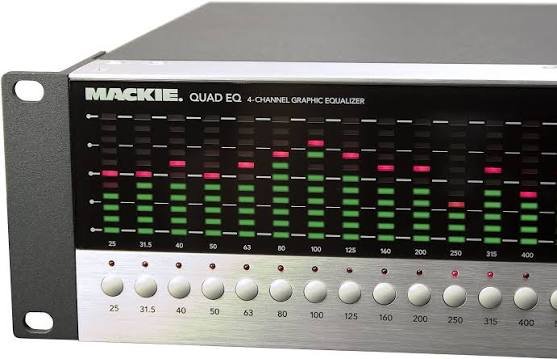
A quad equalizer is a useful audio tool for anyone who wants more control over the way music, voices, movies, games, or other sound sources are heard. Instead of simply turning the overall volume up or down, an equalizer lets you adjust different parts of the frequency range. With four adjustable bands, a quad equalizer offers a straightforward way to shape sound without making the process unnecessarily complicated.
Audio can sometimes feel too muddy, too sharp, too thin, or lacking in energy. The problem is not always the speakers or headphones. Often, certain frequencies simply need a little adjustment. A quad equalizer can help correct those issues by allowing the listener to increase or reduce selected frequency ranges.
The appeal of a quad equalizer comes from its balance between simplicity and control. Beginners can understand four controls relatively quickly, while experienced listeners can use those controls to create a carefully balanced sound profile. It can also be useful in home audio systems, recording setups, vehicles, computers, and other environments where sound quality matters.
In this guide, we will explore what a quad equalizer is, how it works, why people use one, and how to adjust it properly. The goal is to make equalization easier to understand so you can make useful changes without simply turning every control up and hoping for better results.
What Is a Quad Equalizer?
A quad equalizer is an audio equalization system that provides four separate frequency bands for adjusting sound. Each band covers a particular portion of the audio spectrum. Depending on the specific device or software, these bands may be designed around bass, low-midrange, midrange, and treble frequencies.
The main purpose is to give listeners more control over the tonal balance of an audio signal. For example, if music sounds weak and lacks bass, the lower-frequency control can be increased slightly. If vocals sound buried, a suitable midrange adjustment may make them easier to hear. Likewise, reducing excessive high frequencies can make an overly bright recording sound smoother.
A quad equalizer does not necessarily mean that every model uses exactly the same frequency points. Some equalizers allow users to select the center frequency of each band, while others use fixed ranges. The amount of control therefore depends on the hardware or software being used.
One of the biggest advantages of four-band equalization is its accessibility. More advanced parametric equalizers can contain many controls, which can be intimidating for beginners. A quad equalizer keeps the basic concept easy to understand while still providing enough flexibility for meaningful sound adjustments.
How Does a Quad Equalizer Work?
To understand a quad equalizer, it helps to understand the idea of frequency. Sound consists of different frequencies, generally measured in hertz (Hz). Lower frequencies are associated with bass, while higher frequencies contribute to treble. Frequencies in between are responsible for much of the character of instruments and voices.
A quad equalizer separates the audio spectrum into four adjustable sections. Each section can usually be boosted or cut. Boosting increases the level of a particular frequency range, while cutting reduces it. The controls may be displayed as sliders, knobs, or digital settings depending on the equipment.
For example, imagine listening to a song through headphones and noticing that the bass is overwhelming. Instead of lowering the entire volume, you can reduce the low-frequency band. The rest of the music can remain at a comfortable level while the bass becomes more balanced.
The same principle works in reverse. If a recording sounds dull, a small increase in the upper-frequency range may introduce more brightness and detail. The important point is moderation. Equalization works best when adjustments are made gradually rather than dramatically.
Understanding the Four Frequency Bands
The four bands on a quad equalizer can represent different sections of the frequency spectrum. Although the exact ranges vary between models, the controls generally cover low, low-mid, mid, and high frequencies. Understanding their basic roles makes it easier to use the equalizer effectively.
The first band usually focuses on bass frequencies. This area contributes to kick drums, bass guitars, electronic bass, and the low-end weight of music. Increasing it can make sound feel fuller and more powerful, but too much bass can quickly become muddy.
The second and third bands often cover the middle portion of the spectrum. These frequencies are particularly important for vocals, guitars, keyboards, drums, and many other instruments. Changes here can have a noticeable effect because the human ear is highly sensitive to much of the midrange.
The fourth band generally handles higher frequencies. This region contributes to brightness, clarity, cymbals, vocal detail, and the sense of air in a recording. Excessive treble can make sound harsh, while too little can make it seem dull or closed in.
Why Use a Quad Equalizer?
One reason people use a quad equalizer is to personalize their listening experience. Everyone has different preferences, and the same pair of headphones may sound excellent to one person while seeming too bright or too bass-heavy to another. Equalization provides a practical way to adjust the sound according to individual taste.
Another reason is to compensate for the characteristics of audio equipment. Speakers and headphones do not reproduce every frequency with exactly the same level. Some emphasize bass, while others highlight the upper frequencies. A quad equalizer can help create a more balanced presentation.
Room acoustics can also affect sound. In a home audio environment, walls, furniture, room size, and speaker placement can influence how certain frequencies are perceived. Equalization cannot completely fix a poor acoustic environment, but it can sometimes help reduce noticeable tonal problems.
A quad equalizer can also be valuable when listening to different types of content. Music, podcasts, movies, and games may benefit from different tonal profiles. A listener might prefer stronger bass for music while choosing a clearer midrange for spoken dialogue.
Quad Equalizer for Music Listening
Music is one of the most common applications for equalization. Different genres place different demands on the frequency spectrum, so a single sound profile may not work perfectly for everything.
For bass-heavy electronic music or hip-hop, listeners may enjoy a controlled increase in the low-frequency band. However, excessive boosting can make kick drums and bass lines overlap too heavily, reducing definition. A modest adjustment often sounds better than an extreme one.
Rock and acoustic music can benefit from careful midrange adjustments. Guitars and vocals occupy important areas of the middle frequencies, so changing these bands can affect how clearly individual elements stand out in a mix.
Classical and orchestral music often benefits from maintaining a relatively natural tonal balance. Instead of making large changes, a quad equalizer can be used to correct small tonal issues or adapt the sound to particular headphones or speakers.
Using a Quad Equalizer for Vocals and Podcasts
A quad equalizer can also improve the listening experience for spoken content. Podcasts, interviews, audiobooks, and online videos depend heavily on vocal clarity.
If a voice sounds too boomy, reducing some low-frequency content may make speech cleaner. This can be especially helpful when recordings contain excessive room resonance or proximity effect.
If speech sounds muffled, a small adjustment in the mid or upper-midrange may improve intelligibility. However, boosting these frequencies too much can make voices sound unnatural or tiring.
For spoken content, the objective should generally be clarity rather than dramatic tonal change. A good setting makes the voice easier to understand without making the listener immediately notice that equalization has been applied.
Quad Equalizer for Gaming
Gamers can also benefit from frequency adjustments. Modern games contain music, dialogue, environmental effects, explosions, footsteps, and other sounds that occupy different parts of the frequency spectrum.
A balanced low-frequency setting can make explosions and other effects feel powerful without overwhelming dialogue. Meanwhile, appropriate midrange control can help Nemin.io voices and important game sounds remain understandable.
In competitive games, some players prefer a profile that emphasizes frequencies where footsteps or other positional cues are prominent. However, there is no universal setting because games, headphones, and audio engines differ.
It is also important not to assume that more treble automatically means better competitive performance. Excessive high-frequency energy can become tiring and may make the overall audio presentation unpleasant. A controlled adjustment is usually more useful.
How to Adjust a Quad Equalizer Properly
The best way to adjust a quad equalizer is to start from a neutral setting. Listen to familiar music or content before changing anything. Choose recordings that you know well because familiarity makes it easier to identify differences.
Next, make one adjustment at a time. If you change all four bands simultaneously, it becomes difficult to understand which setting caused the improvement or problem. Small changes are easier to evaluate and reverse.
Avoid extreme boosts whenever possible. Large increases can introduce distortion, reduce available headroom, or make one part of the frequency range dominate everything else. Cutting a problematic frequency can sometimes produce a more natural result than boosting everything around it.
Finally, compare the adjusted sound with the original. It is easy to assume that louder means better. When evaluating equalization, try to keep the overall volume reasonably consistent. This makes it easier to judge tonal changes rather than simply responding to increased loudness.
Common Quad Equalizer Mistakes
One common mistake is boosting every frequency band. At first, the result may sound exciting because the entire signal becomes louder and more energetic. However, excessive boosting can reduce headroom and create an unbalanced sound.
Another mistake is making changes based on a single song. A setting that sounds impressive on one recording may sound poor on another. It is better to test an equalizer using several familiar tracks from different styles.
Some users also make the mistake of making large changes too quickly. Equalization is usually more effective when adjustments are subtle. If a problem can be corrected with a small change, there is little reason to make a dramatic one.
Ignoring the source of the problem is another issue. If headphones are uncomfortable, speakers are badly positioned, or the recording itself is poor, equalization may not completely solve the problem. It is one part of a larger audio setup rather than a magic solution.
Hardware vs. Software Quad Equalizers
Quad equalizers can appear as physical hardware or software-based controls. Hardware units are often integrated into audio equipment, amplifiers, mixers, car audio systems, or dedicated signal-processing devices.
The advantage of hardware equalization is that the controls can be immediately accessible. Turning a knob or moving a slider can feel more intuitive than navigating through software menus.
Software equalizers provide greater convenience in many modern setups. They can be integrated into music players, operating systems, audio applications, and mobile devices. Depending on the software, users may also be able to save multiple profiles for different headphones or listening situations.
Neither approach is automatically better. The right choice depends on the equipment, budget, desired flexibility, and level of control needed. For casual listening, software may be more than enough. For dedicated audio work, physical hardware can still be appealing.
Final Thoughts on Quad Equalizer
A quad equalizer offers a practical middle ground between basic volume control and highly complicated professional audio processing. With four frequency bands, it gives listeners enough control to shape sound while keeping the learning curve manageable.

Emily Claire is a dedicated writer and English grammar specialist who helps readers improve their language skills with clarity and confidence. At Grammar Schooling, she turns complex grammar rules into clear, engaging lessons that make learning enjoyable. Her passion lies in empowering learners worldwide to communicate effectively and express themselves with ease.